Unified Asset Manager in CEP Panel

Stop Browsing.
Start Creating.

Asset Station docks directly inside Adobe After Effects & Premiere Pro. Replace 20+ open browser tabs, sketchy downloaders, and recurring stock subscriptions with a single powerhouse panel.

macOS & Windows Ae & Pr CC 2020+ 100% Offline Local AI Lifetime License
The Daily Nightmare

Are You Still Struggling to Find Assets for Edits?

Every motion designer and video editor knows the frustration that breaks your creative flow:

🌐

20+ Tabs & Alt-Tab Fatigue

Constantly jumping between Chrome and your timeline—hunting across Pexels, Pixabay, Pinterest, Freesound, and Sketchfab just for a single clip.

⚠️

Sketchy Downloaders & Ad Spam

Dealing with shady third-party downloaders, popups, malware redirects, and slow throttled servers just to grab a reference video.

Downloading 2GB for a 2-Sec Soundbite

Wasting 10 minutes downloading a 30-minute 4K podcast or video file when you only needed a 1.5-second meme reaction or sound bite.

📁

Blind File Hunting & Laggy Explorers

Explorer and Finder choking on deep drives—no instant audio waveform scrubbing, no interactive 3D WebGL previews, and no quick tagging.

💸

Endless Subscription Bleed

Paying $20–$60/month across separate stock sites, online background removers, cloud upscalers, and credit-limited AI web tools.

✂️

Broken Creative Flow

Manually unzipping archives, dragging files into bins, converting unsupported WebP formats, and relinking missing files every 5 minutes.

All-In-One Solution

8 Powerful Modules in One CEP Panel

Asset Station replaces external downloaders, browsers, file explorers, and AI web tools with an integrated suite docked inside your workspace.

Module 01

1,000,000+ Royalty-Free Stock Assets at Your Fingertips

Search millions of high-quality stock assets simultaneously using one single unified search bar right inside After Effects and Premiere Pro:
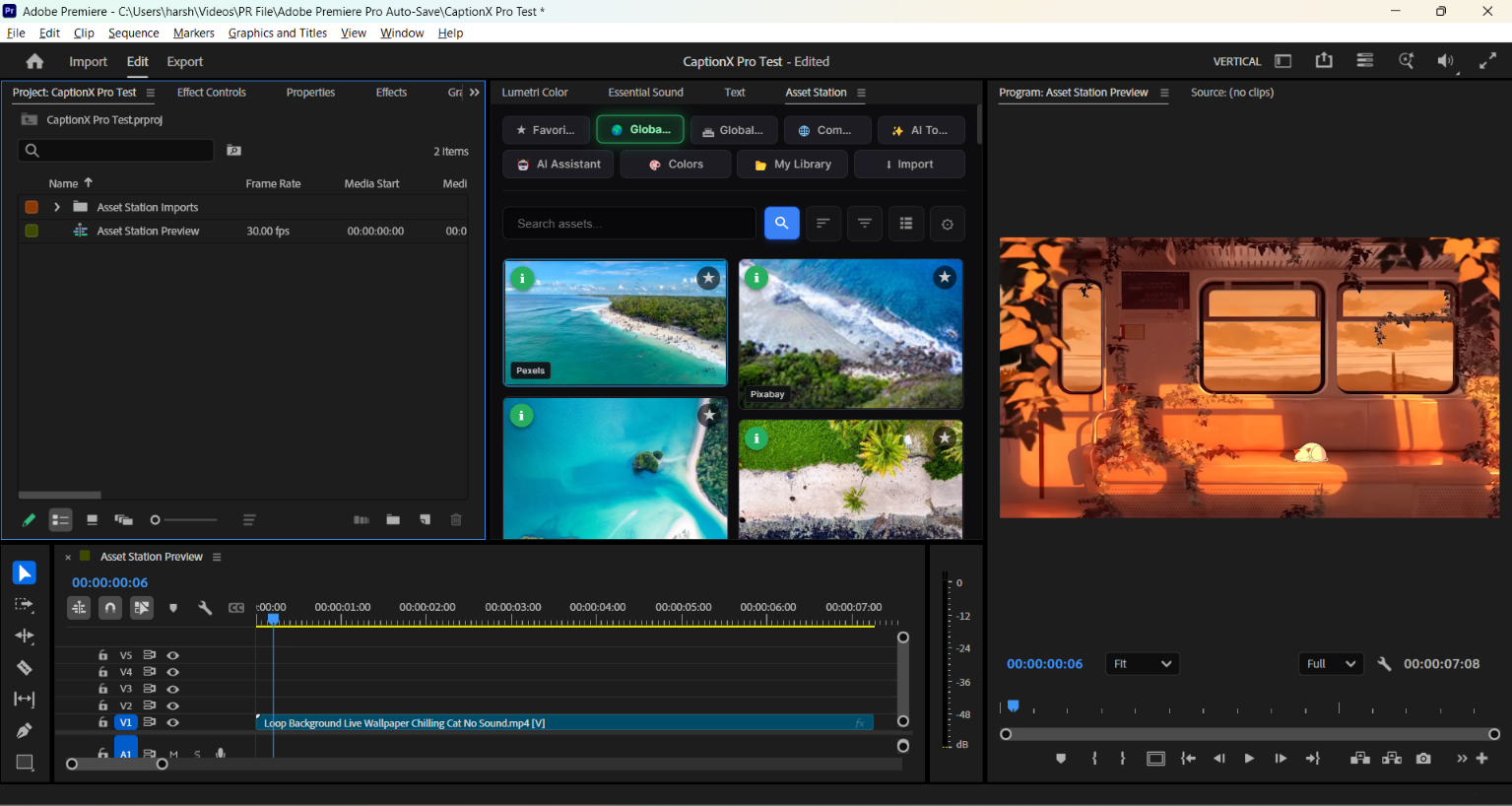
  • Photos & Stock Videos: Instant multi-provider search across Pexels, Pixabay, and Unsplash.
  • SFX & Music Tracks: High-fidelity sound effects from Freesound and open-source audio archives.
  • Interactive 3D Models & HDRIs: Sketchfab and Poly Haven with built-in interactive 3D WebGL previewer.
  • VFX Overlays, GIFs & Emojis: Transparent green screens, animated stickers, and Klipy trending GIFs.
  • 100+ Color Grading LUTs: Split-screen preview swatches with 1-click Lumetri Color application.
  • Google Fonts Library: Preview dynamic typography directly in the panel and import with one click.
  • NASA & World Museum Archives: Public-domain historical images and high-res space footage.
Asset Station Global Stock Search UI
Precision Filtering

Multi-Category Search & Instant Filtering

Quickly switch between media categories right from the search bar—filter between photos, videos, sound effects, 3D models, fonts, icons, vectors, and LUTs with a single click.
  • Instant Double-Click Import: Double-click any asset to immediately import and place it into your active composition or timeline (with native drag-and-drop support in Premiere Pro).
  • Asset Info Panel: Inspect full file details, duration, dimensions, tags, and license information before downloading.
  • Live Media Previews: Audition sound effects with live waveform playback or hover-scrub through video clips directly inside the panel before importing.
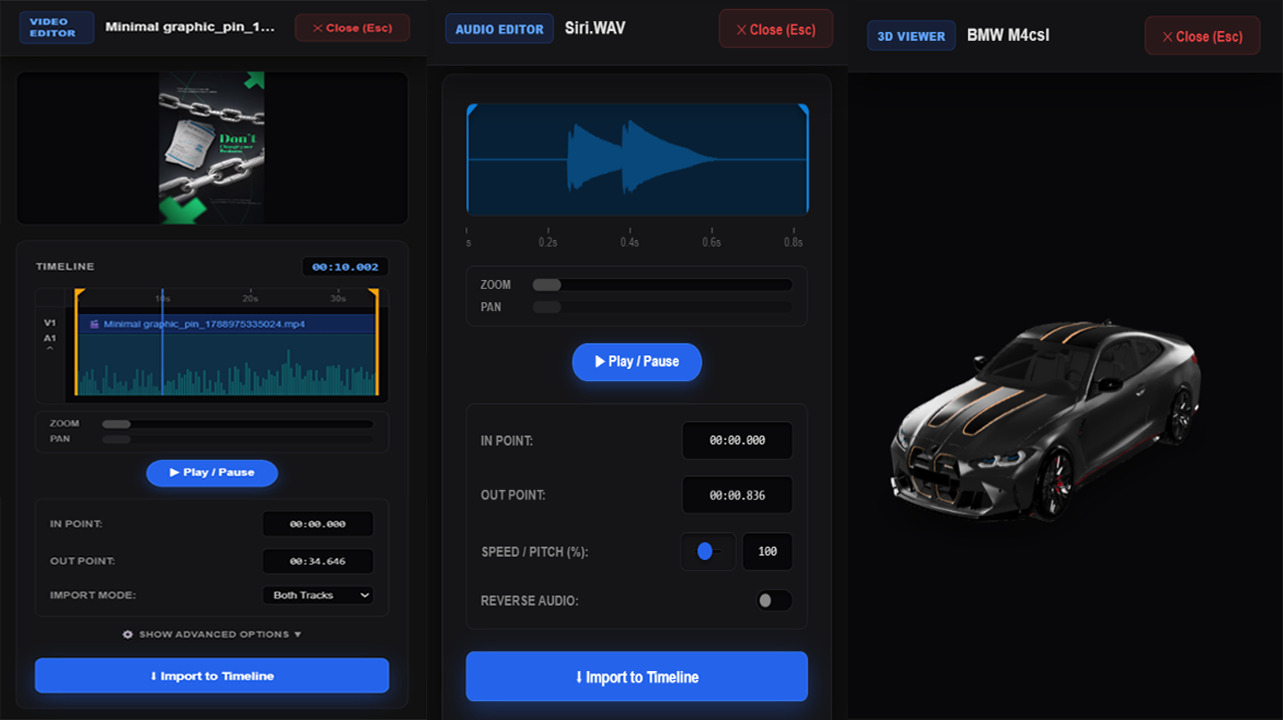
Asset Station Built-in 3D, Video, and Audio Editors
In-Panel Media Editors

Built-in 3D, Video & Audio Editors

Preview, inspect, and trim media directly inside the panel before downloading or importing—saving disk space, memory, and editing time.

  • Interactive 3D Model Viewer: Orbit, zoom, and inspect 3D models (.obj, .gltf, .glb) and HDRIs with realistic lighting and textures without opening external 3D software.
  • Visual Video Editor & Trimmer: Set precise In/Out cut points on video timelines, extract video-only or audio-only tracks, and import only the exact snippet you need.
  • Audio Waveform Editor: Trim sound effects with visual waveform scrubbing, adjust speed and pitch, or reverse audio with one click before placing it into your sequence.
Module 02

Ultra-Fast Local Asset Search (Faster Than File Explorer)

Stop waiting for slow Windows Explorer or macOS Finder searches. Asset Station searches your local folders, drives, and external SSDs instantly.
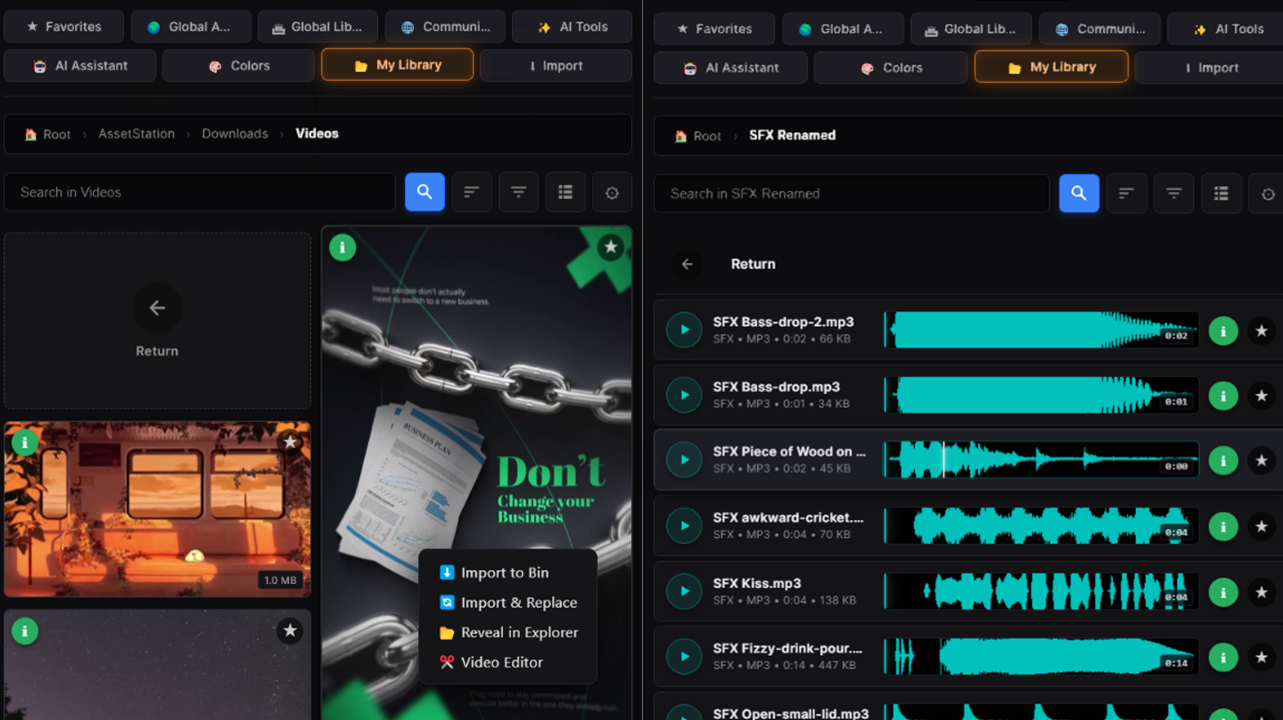
  • Instant File Search: Search through tens of thousands of local files in seconds—type simple keywords to find matching sounds, footage, and graphics immediately.
  • Live Video Scrubbing: Hover your mouse over any video file to scrub through frames and preview the shot before importing.
  • Instant Audio Hover Previews: Hover over any sound effect or music file to see animated visual waveforms and listen instantly without adding it to your timeline.
  • Automatic Format Conversion: Unsupported web files (WebP, WebM, SVGs) automatically convert to production-ready PNG/MP4 files behind the scenes so they import smoothly.
Asset Station Smart Folder Navigation and Audio Auto-Sorting
Library Organization

Smart Folder Navigation & Audio Auto-Sorting

Browse your personal sound libraries and footage collections with intuitive folder navigation and smart categorization.

  • Auto-Sort Music vs. Sound Effects: Automatically separates full background music tracks from short sound effects so you can find the right audio type in one click.
  • Smooth Folder Breadcrumbs: Jump between root drives, nested project folders, and subdirectories with clickable breadcrumb navigation.
  • 1-Click Favorites: Bookmark your most frequently used sounds, clips, and templates to keep your go-to assets readily accessible.
Module 03

Built-in YouTube, Pinterest & Universal Downloader + Lossless Trimmer

Find reference videos, sound effects, B-roll, and aesthetic moodboards without ever opening a web browser or using spammy downloader sites.
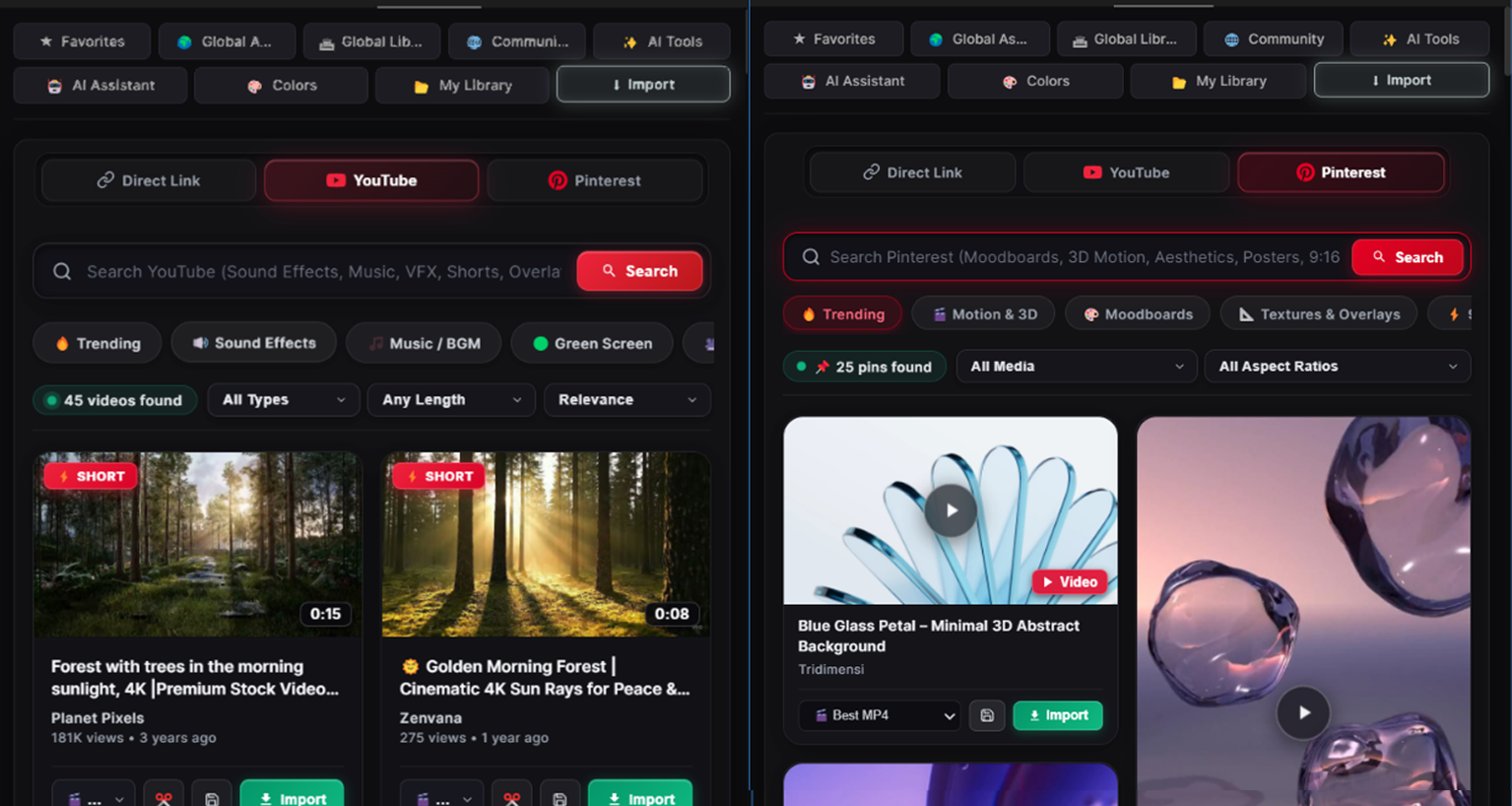
  • Search & Stream YouTube Directly: Find B-roll, memes, sound effects, and tutorials right from the CEP panel.
  • Native Pinterest Moodboard Discovery: Browse Pinterest in a multi-column masonry grid. Grab high-res aesthetic pins, 3D motion references, and 9:16 vertical clips.
  • Lossless In/Out Trimmer: Set precise In/Out markers on visual scrubbing timelines and audio waveforms to download only the exact 2-second snippet you need—saving disk space and time.
  • Universal Link Downloader: Paste URLs from YouTube, Pinterest, TikTok, Instagram, Twitter/X, Vimeo, or Reddit to download directly into your workspace.
  • Pristine Formats: Grab up to 4K resolution video or extract clean 48kHz WAV / 320kbps MP3 audio straight to your active bin.
Asset Station YouTube and Pinterest Downloader with Visual Trimmer
Module 04 • Zero Subscription Fees

100% Offline Local AI Studio & Online AI Image Generator

Harness the power of cutting-edge neural networks running directly on your computer's GPU/CPU with zero cloud fees, plus fast cloud image generation via Hugging Face.

Asset Station bundles production-ready AI models with dedicated local and cloud workflows:
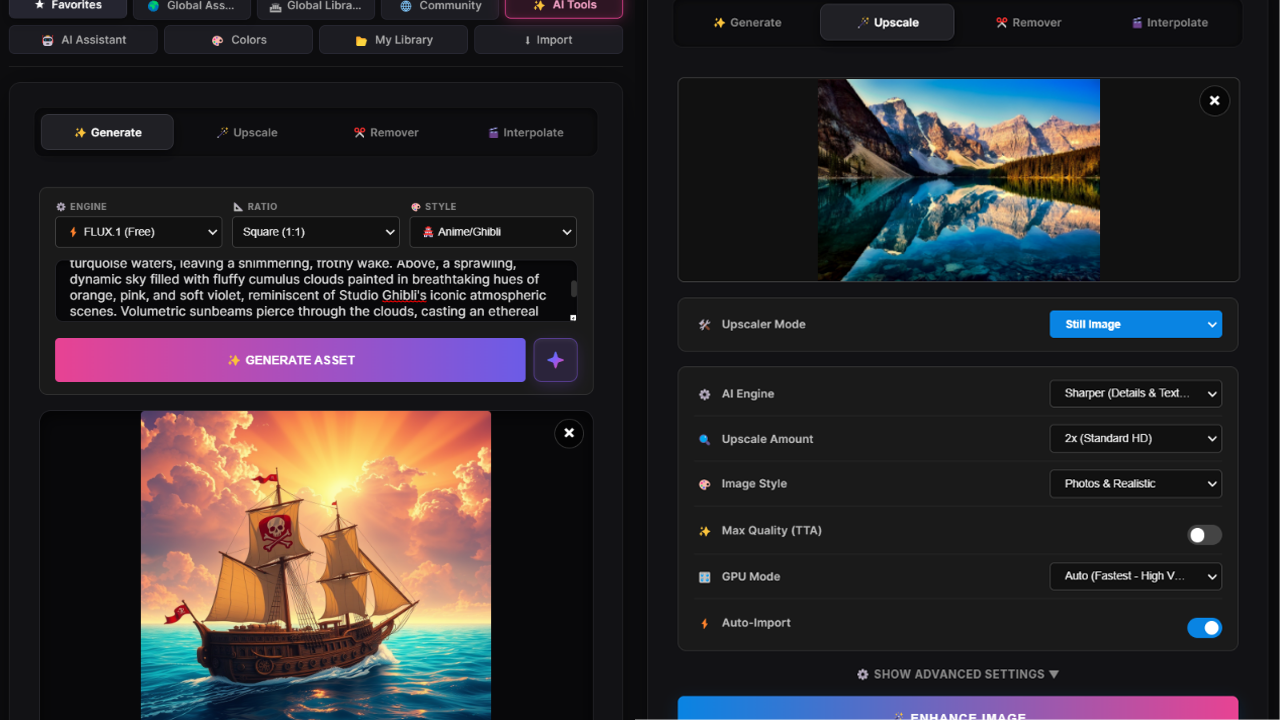
  • Instant Background Removal (100% Offline): Cleanly isolate subjects, anime, products, and graphics with automated U²-Net & ISNet edge matting running directly on your GPU/CPU.
  • Object & Watermark Inpainting (100% Offline): Brush over unwanted logos, wires, blemishes, or text on the interactive canvas to erase them invisibly with LaMa AI without an internet connection.
  • 4x Super-Resolution Upscaler (100% Offline): Upscale low-res images and footage up to 4x with sharp detail reconstruction using Real-ESRGAN locally on your workstation.
  • AI Frame Interpolation (100% Offline): Convert standard 24/30fps footage into silky-smooth 60fps+ or cinematic slow motion with RIFE v4.6 on your hardware.
  • Hugging Face Image Generation (Online Cloud): Generate high-resolution concept art, textures, and illustrations directly into your timeline using cloud-hosted Hugging Face FLUX.1 with zero heavy VRAM requirements.
  • 100% Private & Unlimited Local Processing: Client footage processed through local tools never leaves your workstation—zero API fees, zero credit subscriptions, and complete data privacy.
Asset Station Offline Local AI Studio and Hugging Face Online Image Generation
Module 05

Gemini AI Assistant & Expression Generator

Never struggle with complex math, trigonometry, or ExtendScript syntax again. Prompt the built-in AI to craft custom code tailored to your exact active project.
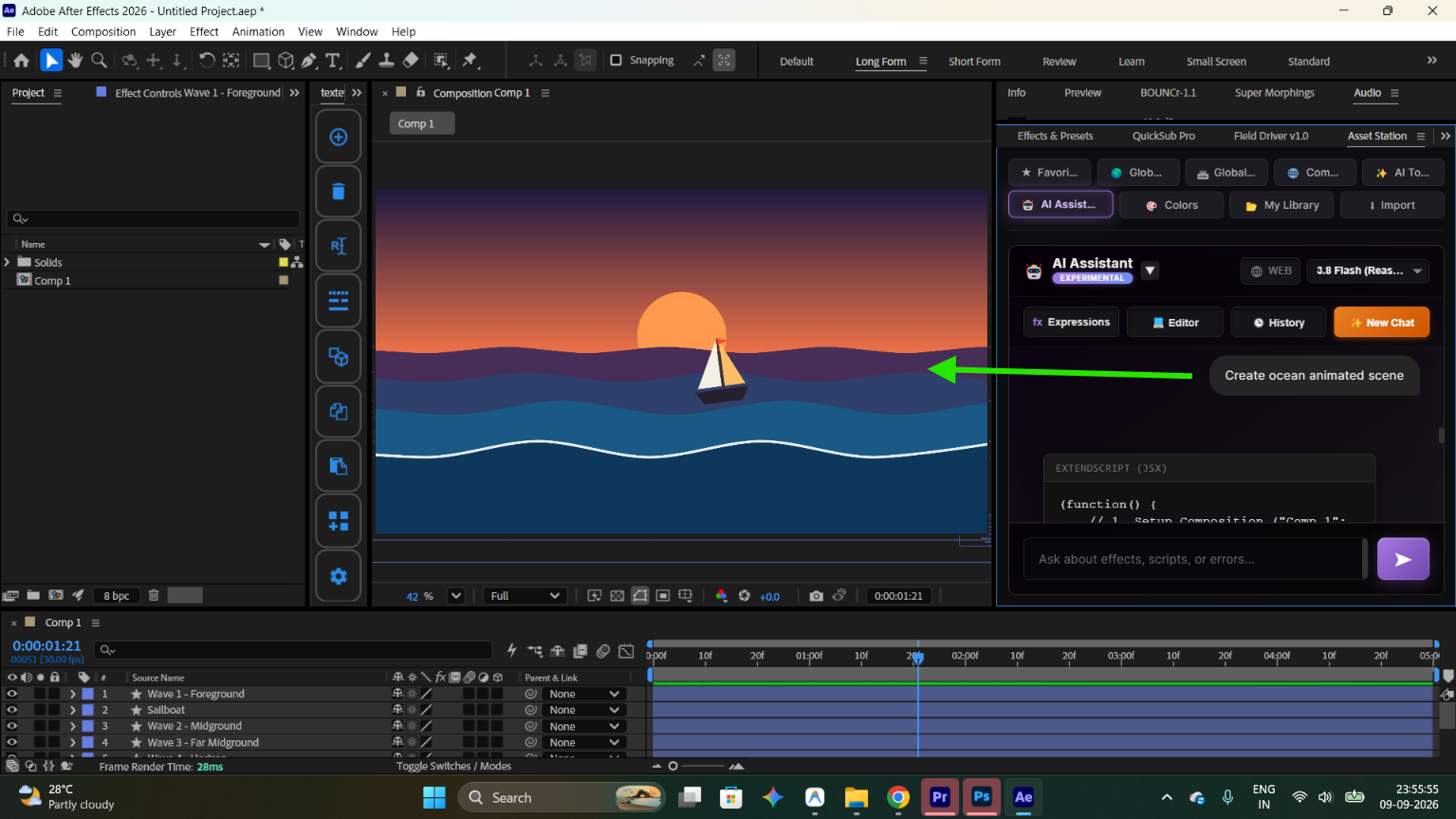
  • Context-Aware Expression Creator: Automatically recognizes your active composition name, layer names, and timeline properties.
  • Interactive Code IDE: Review, tweak, and debug generated expressions in a full syntax-highlighted editor before applying.
  • 1-Click Execution: Inject expressions directly onto selected timeline properties with a single click.
Asset Station Gemini AI Assistant and Expression Generator IDE
Module 06

Color Harmony Studio & AE Solid Generator

Build cinematic, harmonious color palettes in seconds and apply them across your projects with zero friction.
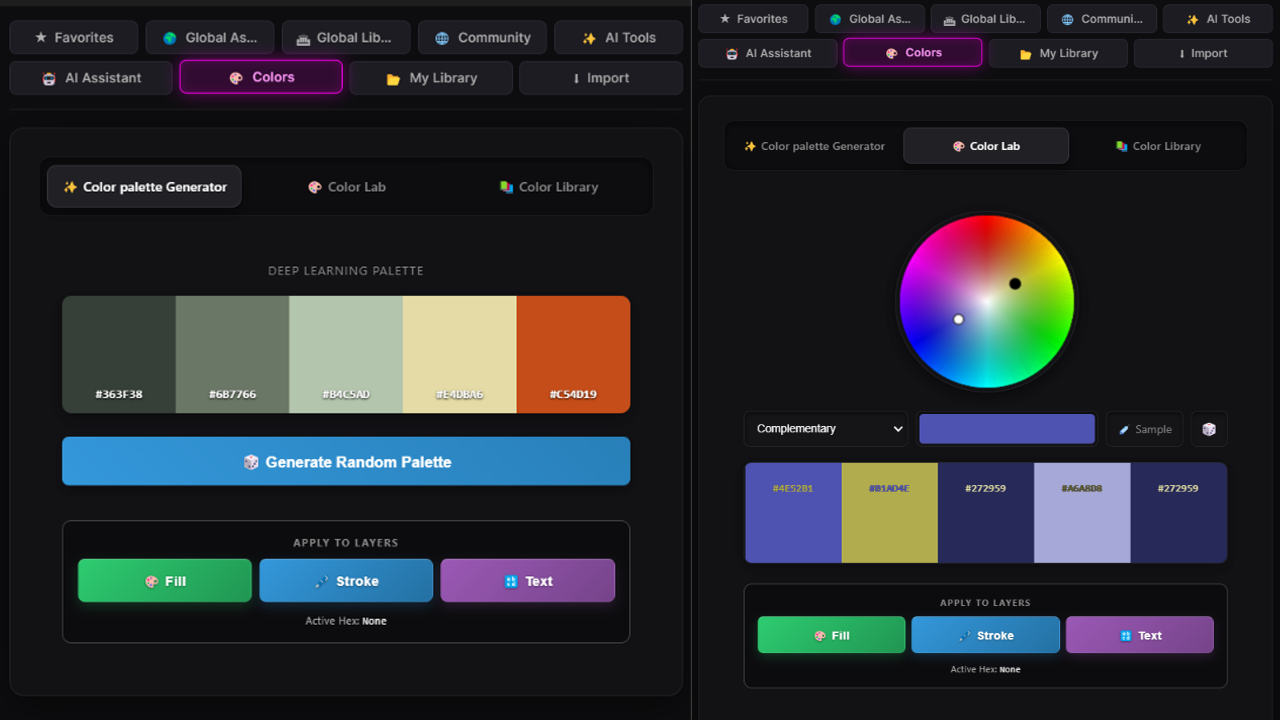
  • Smart Palette Generator: Generate Monochromatic, Complementary, Analogous, and Triadic color harmonies.
  • Image Color Extraction: Pull dominant color schemes directly from any selected footage or image frame.
  • 1-Click Host Sync: Automatically generate colored Solid Layers in After Effects or inject Hex swatches directly into Premiere Pro Lumetri controls.
Asset Station Color Harmony Studio and Palette Generator
Module 07

Free Community Cloud Library & Asset Hub

Access a growing, cloud-synced library of free creative assets that updates automatically—browse fresh templates, sound effects, presets, overlays, and scripts without needing to update the plugin.
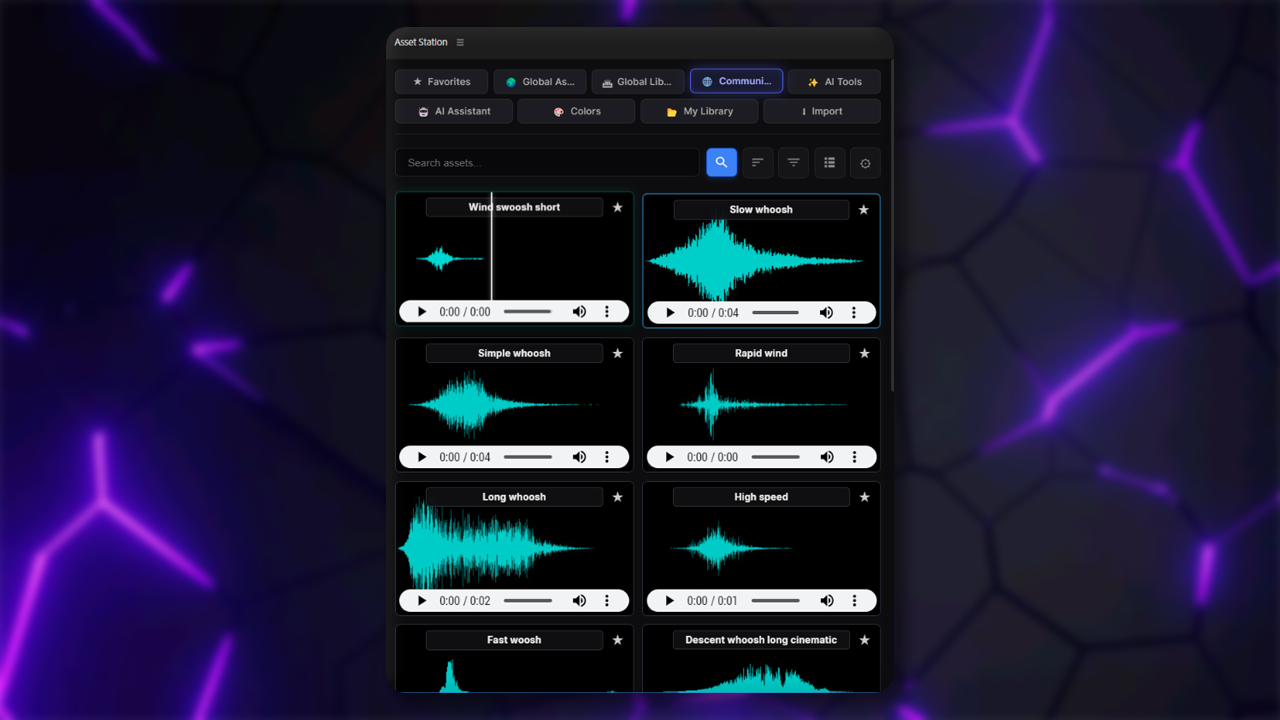
  • Comps, Motion Graphics & Mogrts: Ready-to-use After Effects project compositions, animated lower thirds, title intros, and Premiere Pro .mogrt templates.
  • SFX, Music & Audio Loops: High-impact sound effects, cinematic whooshes, risers, and royalty-free music tracks with instant visual waveform previews.
  • VFX Overlays, Textures & Green Screens: Transparent green screens, background loops, glitches, and textures ready to drop into your timeline.
  • 1-Click .ffx Presets & Automation Scripts: Apply animation presets directly to layers or run community ExtendScript (.jsx) tools to automate repetitive tasks.
Asset Station Community Presets, Audio, and Template Hub
Module 08

Smart Favorites & Library Management

Build a curated motion design library tailored to your signature editing style without modifying or cluttering your hard drive file structure.
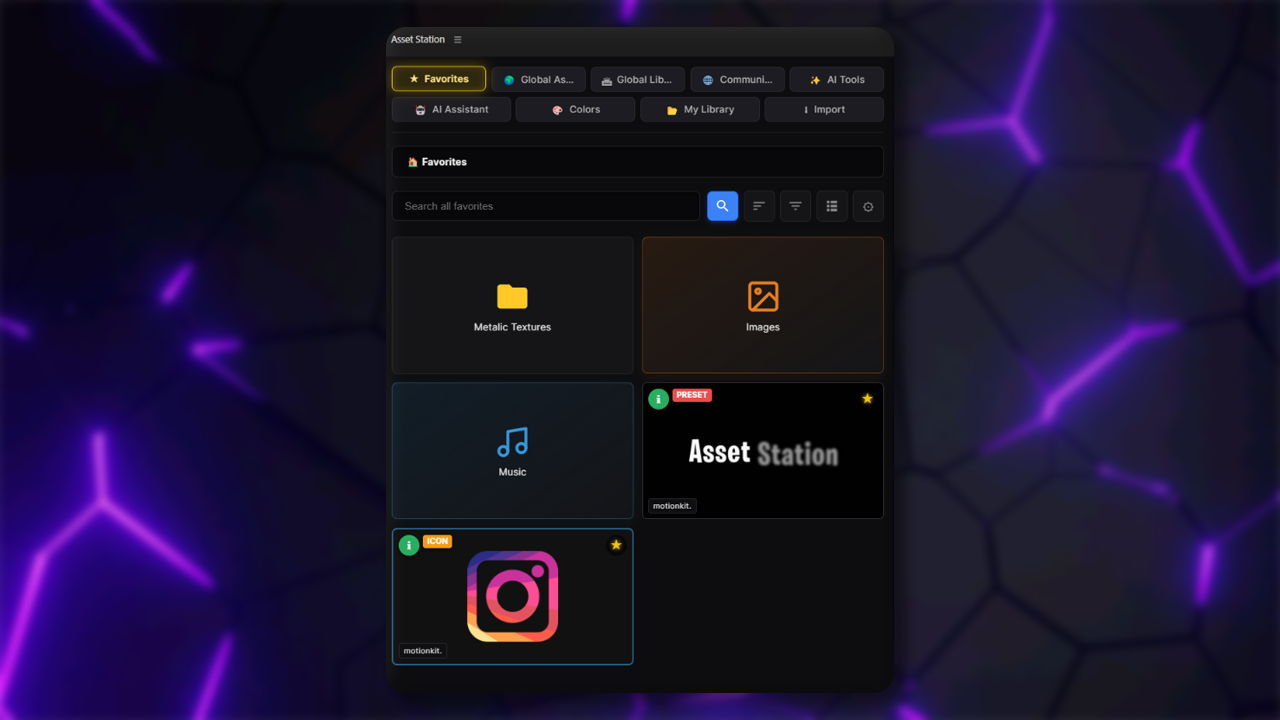
  • Custom Virtual Folders: Create, rename, and nest custom virtual folders to organize your personal asset bins without altering your computer's actual drive structure.
  • 1-Click Universal Bookmarking: Star any asset from Global Stock, Local Search, Community Hub, YouTube, or Pinterest to access it instantly from your Favorites.
  • 1-Click Comp Packager & Bundler: Save any active After Effects composition directly to your library, automatically packaging used footage and dependencies for future reuse.
  • Multi-Selection & Batch Actions: Select multiple audio tracks, overlays, or footage clips with the floating action bar to batch-import or organize them in seconds.
  • Automatic Project Bin Sorting: Automatically sorts imported assets into neat project bins (Audio, Footage, Presets) inside After Effects and Premiere Pro to keep your project panel tidy.
Asset Station Smart Favorites and Asset Library Management
Direct Comparison

The Difference: Old Way vs. Asset Station

See why top motion designers and editors switch to Asset Station to reclaim hours every week:

The Old Way

1. Finding Stock Media

15+ open browser tabs, constant Alt-Tabbing, watermarked previews, and manual folder downloads.

2. Grabbing YouTube & Web Clips

Shady downloader websites, annoying ads, downloading 2GB videos for a 2-second clip, and separate trimming software.

3. AI Tools & Upscaling

$20–$60/month across separate cloud subscriptions with strict credit limits, queues, and privacy concerns.

4. Local File Organization

Slow File Explorer / Finder with no waveform previews, unsupported WebP crashes, and blind file digging.

With Asset Station

1. Finding Stock Media

1 single search bar inside AE & Premiere Pro with multi-source searching and instant double-click timeline import.

2. Grabbing YouTube & Web Clips

In-panel YouTube & Pinterest search with visual In/Out trimming before downloading only what you need.

3. AI Tools & Upscaling

100% offline, unlimited local AI engines (U²-Net, LaMa, Real-ESRGAN, RIFE) with zero monthly subscription fees.

4. Local File Organization

Instant search indexing (10x faster), live audio waveforms on hover, video hover scrub, and auto-conversion shield.

Zero Monthly Subscriptions

How Does it Work? (Bring Your Own Key)

To keep Asset Station a one-time purchase forever with zero recurring monthly fees, cloud services operate on a modern BYOK (Bring Your Own Key) model.

100% Free Tiers

Services like Google Gemini AI, Hugging Face, Pexels, Pixabay, Unsplash, Freesound, and Sketchfab provide generous free API keys that take less than 60 seconds to create.

Beginner Guide

We provide a crystal-clear, step-by-step setup guide with direct 1-click links so you can get up and running in minutes without technical experience.

Maximum Privacy

Your API keys are stored 100% locally on your machine and are never shared, logged, or transmitted to any third-party server.

Works Out-of-the-Box

Core tools like YouTube & Pinterest download, Local AI background removal, Inpainting, RIFE slow-mo, ESRGAN upscaler, and Local Drive search require zero API keys!

System Requirements

Please ensure your machine meets these requirements before purchasing:

  • Host Applications: Adobe After Effects & Adobe Premiere Pro (CC 2020 to CC 2026+).
  • Operating System: Windows 10/11 (64-bit) or macOS (Intel & Apple Silicon M1/M2/M3/M4 fully supported).
  • Memory: 16GB RAM recommended (8GB minimum). We recommend having at least 4–6GB of free RAM available when running local AI upscaling or slow-mo interpolation.
  • Graphics (For AI Tools): Vulkan-compatible GPU (NVIDIA, AMD, or Apple Silicon) recommended for ultra-fast AI rendering. CPU mode is also supported.

What You Get

  • The com.assetstation Extension (.zxp): One-click installer for Adobe After Effects and Adobe Premiere Pro.
  • Full Access to All 9 Modules: Global Stock Search, Ultra-Fast Local Engine, Offline Local AI Studio, YouTube Downloader & Trimmer, Gemini AI Assistant & Code IDE, Color Harmony Studio, Community Library, Smart Favorites.
  • Pre-Configured Local AI Models & Binaries: Includes Real-ESRGAN 4x upscaler, RIFE v4.6 frame interpolator, LaMa inpainting, U²-Net background remover, FFmpeg, and yt-dlp.
  • Lifetime Access & Updates: Zero recurring subscriptions or cloud token fees.
  • Complete Documentation & Setup Guide: Beginner-friendly guide with Discord community access.
Built For Creators

Who Is Asset Station For?

Video Editors

Instantly find B-roll, preview SFX waveforms on hover, download and trim YouTube clips directly to your timeline, and apply color LUTs with 1 click.

Motion Designers

Eliminate tedious green-screen keying with offline AI background removal, erase unwanted objects/watermarks with LaMa inpainting, and auto-generate complex AE expressions.

Content Creators

Stop drowning in 20+ browser tabs. Grab royalty-free stock footage, sound effects, trending GIFs, green-screen memes, and Google Fonts all inside one single panel.

One-Time Investment

Get Asset Station Today

Automate your asset hunting, downloads, and AI workflows. Pay once, own it forever.

🔥 Early Bird Launch Sale
Asset Station
Unified Asset Manager & Offline AI Studio for After Effects and Premiere Pro.
Mac & Win | Ae & Pr CC 2020+
$200.00 Save $120.01
$79.99one-time
Secure Checkout via Card, UPI, Apple Pay & Google Pay
Early Bird Access
44/100 Claimed
  • 1,000,000+ Royalty-Free Stock Assets
  • Ultra-Fast Local Drive Search
  • YouTube & Pinterest Downloader
  • 100% Offline Local AI Studio
  • Gemini AI Assistant & Expression IDE
  • Community Presets & Cloud Library
  • Lifetime License (No Subscriptions)

Frequently Asked Questions

How many users or devices can use 1 license?

A maximum of 3 slots for users or devices are allowed to use 1 license at a time. If you want to transfer or free up a slot, simply click the "Reset License" button inside the Asset Station panel settings.

Do you have a refund policy?

We provide a 7-day free trial before purchasing so you can test and confirm that Asset Station integrates smoothly into your workstation workflow. Because this is a digital software product, standard refunds cannot be initiated once purchased unless our technical support team fails to resolve a verified defect on your system.

What is BYOK and do I have to pay monthly fees?

Zero monthly subscriptions forever. BYOK (Bring Your Own Key) means that cloud integrations (Google Gemini AI, Pexels, Pixabay, Unsplash, Freesound, Sketchfab) connect directly to their official free-tier APIs. We provide a step-by-step setup guide with direct links, and getting your free API keys takes less than 60 seconds.

Does Asset Station work offline?

Yes! The Local AI Studio (Background Removal, Inpainting, RIFE Slow-Mo, Real-ESRGAN Upscaling) and Local Drive Search work 100% offline on your machine with zero API keys required. Online features like Hugging Face image generation, YouTube/Pinterest downloads, stock libraries, and the Gemini AI assistant require an internet connection.

What are the hardware and RAM requirements for the local AI models?

We recommend a minimum of 16GB RAM (8GB minimum) and at least 4–6GB of available free RAM when running local AI upscaling or slow-mo frame interpolation. A Vulkan-compatible GPU (NVIDIA, AMD, or Apple Silicon M1/M2/M3/M4) is recommended for lightning-fast hardware acceleration. CPU mode is also supported automatically as a fallback.

Which versions of After Effects and Premiere Pro are supported?

Asset Station supports Adobe After Effects and Adobe Premiere Pro from CC 2020 through CC 2026+ across both Windows 10/11 (64-bit) and macOS (Intel & Apple Silicon natively).

Will I receive new updates and community presets in the future?

Yes! Your lifetime license includes free future updates. Furthermore, the Community Preset & Template Hub is cloud-based, meaning new community compositions, Mogrts, and .ffx animation presets appear in your panel dynamically without needing to reinstall the plugin.

We're Here to Help

Support & Community

Encounter a bug, need troubleshooting assistance, or want to request a feature? Reach out anytime:

Thanks for your purchase!

Your transaction was successful.